

New MT5 release comes equipped with more AI features

On Friday, September 4, 2026, an updated version of the MetaTrader 5 (MT5) platform will be released.
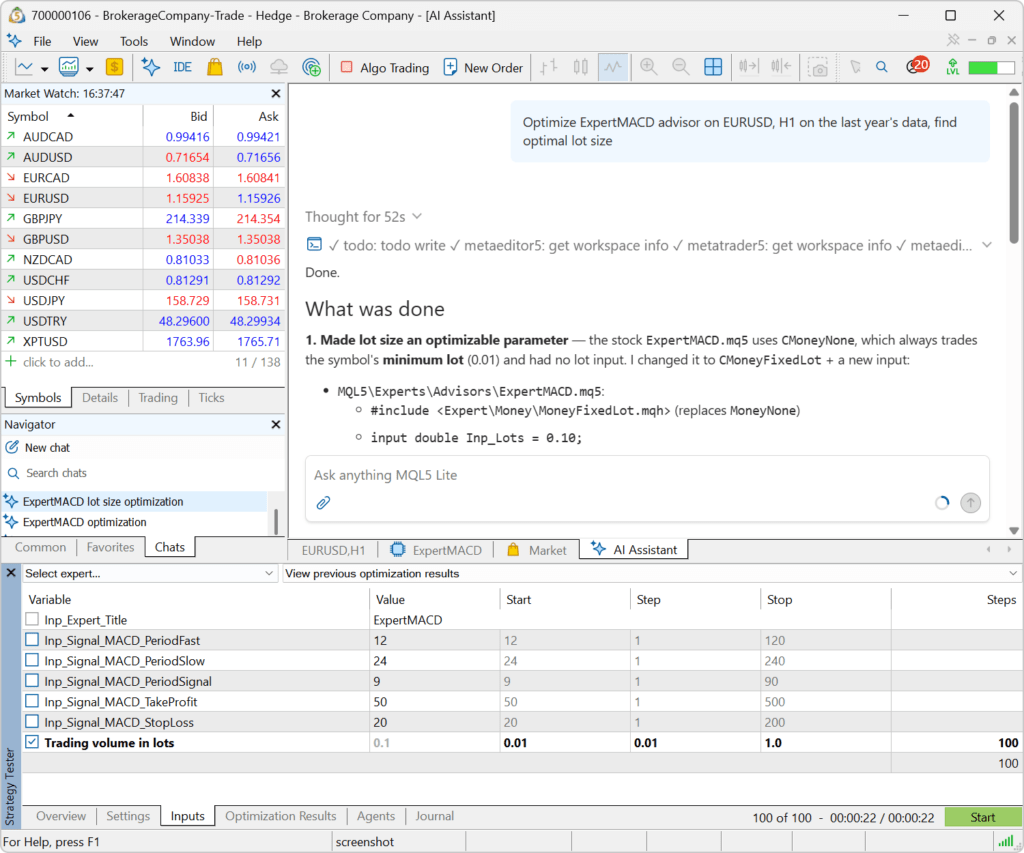
The platform now includes significantly expanded capabilities of the AI Assistant for working with the trading platform and Strategy Tester. The assistant can now retrieve and analyze tester reports and logs, check its current settings, help launch optimizations, add indicators to charts with specified parameters, and work with terminal and Expert Advisor logs.
This allows MT5 users to delegate more complex tasks related to testing, optimization, and analysis of trading robots directly to the MetaTrader 5 agent.
For developers, the platform has expanded the capabilities for working with complex matrices and vectors in MQL5. Support for additional methods simplifies the processing, conversion, and validation of complex data in mathematical and analytical tasks.
The web terminal now provides improved handling of stop levels on netting accounts. When placing a new trade for an instrument that already has an open position, the terminal preserves the position’s current Stop Loss and Take Profit levels, preventing them from being accidentally removed.
MetaTrader 5 Client Terminal
Terminal: Expanded the set of tools available to the AI Assistant. The agent can now perform more actions directly in the trading platform and Strategy Tester, making it easier to analyze, test, and optimize trading robots.
The following capabilities have been added:
- Retrieving Strategy Tester reports — the AI Assistant can independently retrieve testing and optimization results for further analysis. For example, you can ask it to evaluate the performance of an Expert Advisor, compare the results of different optimization passes, or identify potential issues in a strategy.
- Launching optimization — the assistant can help configure Expert Advisor optimization criteria in the Strategy Tester.
- Retrieving the current tester settings — the assistant can check the selected Expert Advisor, symbol, period, and other testing parameters before executing a task.
- Retrieving the tester log — this allows the AI Assistant to analyze tester messages, identify errors, and help determine the causes of problems encountered during testing and optimization.
- Adding indicators to a chart — the assistant can add the required technical indicators and configure their parameters. For example, you can ask it to add two moving averages with periods of 20 and 50 to the current chart.
- Getting terminal and Expert Advisor logs — the AI Assistant can analyze system messages and logs generated by running MQL5 programs, helping identify errors and determine their causes.
- MQL5: Added support for the HasNan and ReplaceNan methods for complex matrices and vectors (matrixc, matrixcf, vectorc, vectorcf).
- MQL5: Added support for the Split, HSplit, VSplit, SwapRows, and SwapCols methods for complex matrices (matrixc, matrixcf).
- MQL5: Added support for the Fill, Flat, and Reshape methods for complex float matrices (matrixcf).
- MQL5: Added support for the Assign and Swap methods for complex matrices and vectors (matrixcf, vectorcf).
- MQL5: Added support for the Free method for complex matrices and all vector types (matrixc, matrixcf, vector, vectorf, vectorc, vectorcf).
- Tester: Fixed chart event handling during visual testing. Pressing keys during testing could previously result in a runtime error.
MetaTrader 5 Web Terminal
- Improved setting of stop levels when opening positions on accounts using the netting system. If a trade operation is executed for a symbol, for which there is a position, the current Stop Loss and Take Profit of the open position are automatically inserted in the order placing window. This prevents the current stop levels from being accidentally removed.
- Fixed repeated loading of trading instrument data.
- Fixed an issue where quotes might not appear after adding an instrument to Market Watch.
The update will be delivered through the Live Update system.