Interactive Brokers adds Options Strategy Selector in Strategy Builder

Electronic trading major Interactive Brokers continues to enhance the capabilities of the IBKR Desktop platform. Version 1.4 of the platform adds Options Strategy Selector in Strategy Builder.
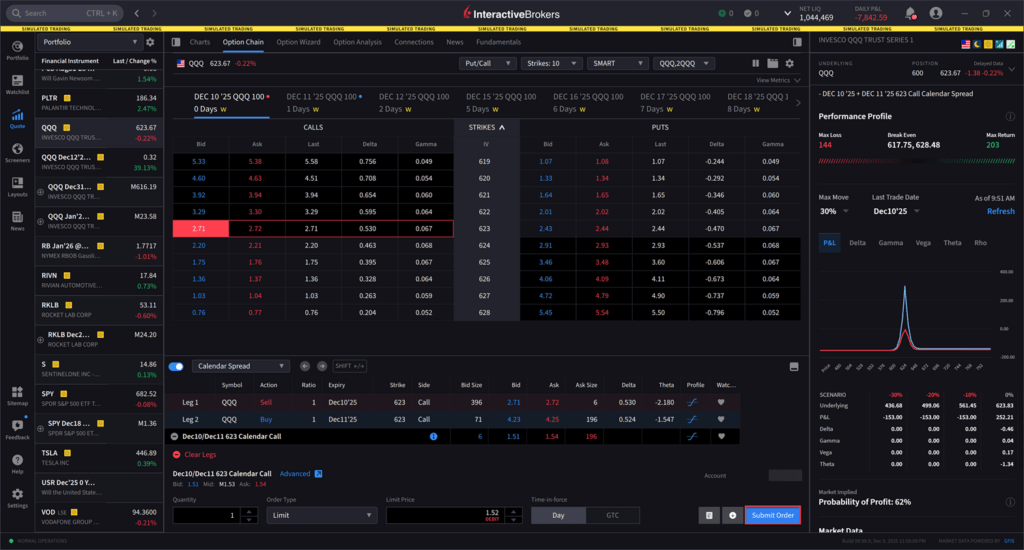
The platform now offers pre-defined option strategies in the Strategy Builder Drawer, allowing traders to select a strategy before defining individual legs.
To access this, please take the following steps:
- Navigate to Quote and select the Underlying asset from the left-hand side.
- Click the Option Chain tab.

- At the bottom of the page, select the toggle icon to use the Strategy Builder.
- Select the Custom drop-down menu to select a strategy from the populated list.
- In this example, Calendar Spread is selected. Next, select the desired leg from the Option Chain. The spread will update automatically in the Strategy Builder.

- Alternatively, after clicking your desired strategy, you may navigate back to the strategy drop-down menu and select Auto-Place At Money. This allows your strategy to be placed approximately at-the-money relative to the current market price.
- Enter the additional order parameters at the bottom of the strategy builder and select Submit Order to transmit.