
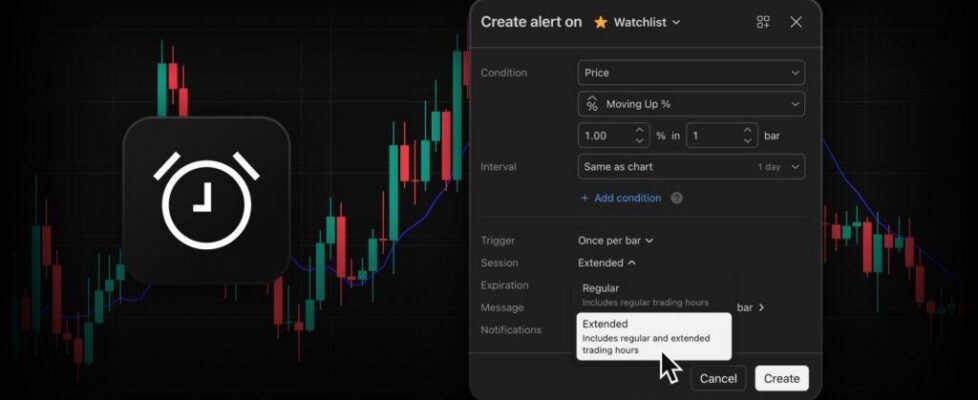
TradingView enables extended hours support for watchlist alerts

TradingView has expanded its automation toolkit. The watchlist alerts now support extended trading hours (ETH), helping TradingView users stay on top of market activity and react faster to major events.
Unlocking pre-market and post-market data for your entire watchlist at once brings a new level of precision and convenience to your daily routine:
- Capture off-hours momentum: Stay instantly informed about pre-market gap-ups or post-market earnings reactions across hundreds of symbols simultaneously
- Maximum efficiency: Instead of manually building individual alerts for every single symbol to monitor pre-market and post-market activity, a single watchlist alert does the work for you
- Automatic syncing: Your alert updates itself. If you add a new symbol to your watchlist, the active alert automatically starts tracking it. Remove a symbol, and it stops tracking it
Setting up extended-hours monitoring for your watchlist takes just a few clicks:
- Open the Create alert dialog and select your Watchlist
- Define your technical condition (e.g., Price Moving Up)
- In the bottom parameters section, open the Session dropdown and switch it to Extended.
A few things to keep in mind:
- Timeframes: Extended monitoring applies to intraday intervals (minutes, hours). Daily alerts are calculated using standard daily bars
- Asset coverage: Extended-hours monitoring is available for US stocks and ETFs
- Futures exception: Futures symbols in your watchlist always calculate using their native electronic trading hours (ETH), regardless of the selected session.


