

New MT5 beta build comes equipped with AI integration, passkey support, and code management improvements in MetaEditor

Fintech company MetaQuotes has announced that on Thursday, July 16, 2026, a new beta version (build 6030) of the MetaTrader 5 platform will be released.
The main new feature of this release is the built-in support for the Model Context Protocol (MCP) and AI agents. The terminal and MetaEditor now include an integrated AI Assistant that can help analyze markets and trading activity, develop MQL5 applications, explain code, identify errors, and automate complex tasks. In addition to the built-in assistant, the platform supports external MCP-compatible AI agents, including OpenAI Codex, Claude Code, and other solutions.
Another important addition is Passkey support — a modern technology for securing trading accounts. Passkeys provide an additional authentication factor during sign-in, protecting users against phishing attacks and unauthorized access. Passkeys can be stored either on a mobile device or on a hardware security key.
For developers, MetaEditor has been significantly enhanced. The editor now includes the long-awaited code folding and highlight all occurrences features, making it much easier to work with large projects. MQL5’s mathematical capabilities have also been expanded by introducing new linear algebra and matrix methods based on LAPACK and OpenBLAS, optimizing several Standard Library functions, and delivering numerous fixes and improvements across the terminal, Strategy Tester, and Help system.
The release provides the following new features:
- MetaTrader 5 Client Terminal
The platform now offers native support for the Model Context Protocol (MCP) and agentic AI. The new features enable an entirely new way to interact with the trading platform: trade, analyze markets and strategies, and develop and test Expert Advisors with the assistance of AI.
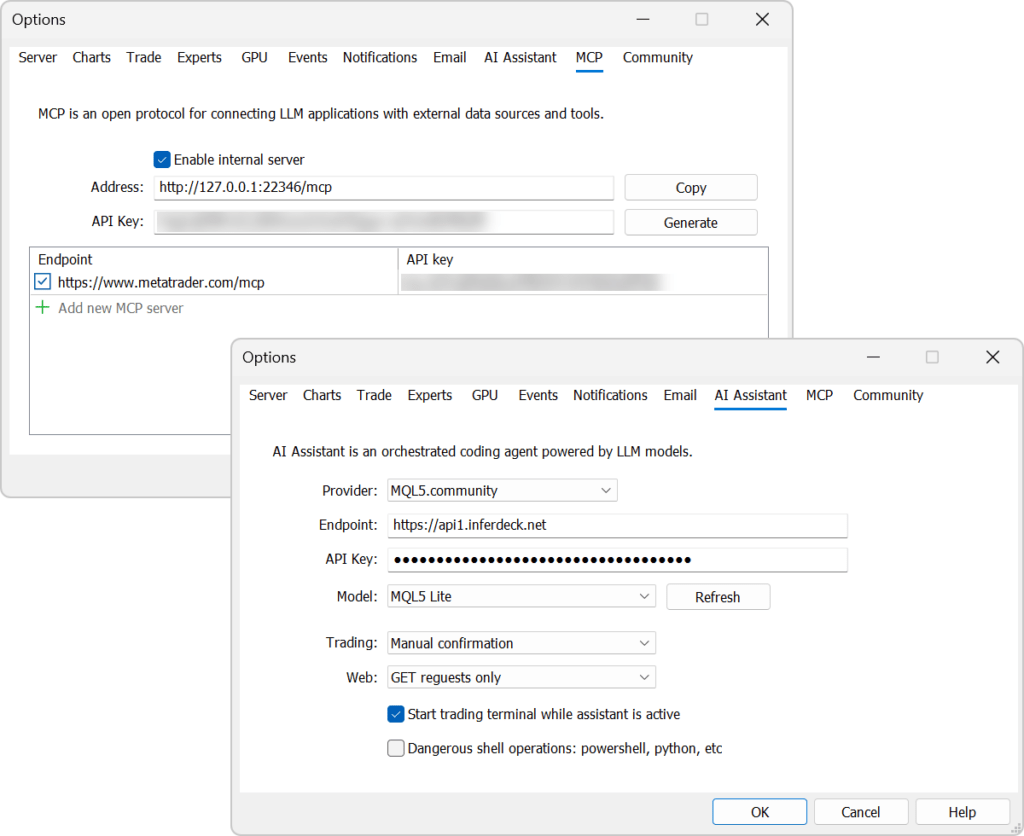
The Model Context Protocol (MCP) is an open standard that enables applications to communicate with AI agents. Unlike traditional chatbots, AI agents can independently complete complex tasks by breaking them down into a sequence of actions and using the capabilities of connected applications.
With built-in MCP support, MetaTrader 5 becomes a fully featured source of market data and trading functionality for modern AI agents. They can access market information, analyze charts, work with the trading environment, and perform required operations through the standard MCP interface.
In addition to the built-in AI assistant, you can also connect external systems that support MCP, including OpenAI Codex, Claude Code, and other compatible solutions.
To start using AI features, simply sign in to the platform using your MQL5.community account. All users will automatically receive access to the free MQL5 Lite plan. After updating, the platform automatically configures everything you need: MQL5.community is selected as the default AI provider, and the required API key is added automatically.
If you prefer, you can use your own API keys for OpenAI, Anthropic, Gemini, DeepSeek, Ollama, or other supported providers, and select your preferred model directly in the terminal settings.
Your AI settings are automatically synchronized between the trading terminal and MetaEditor.
- AI Assistant in MetaTrader 5
The built-in AI Assistant helps you analyze markets. It can explain current market conditions for a symbol, review your open positions, analyze your trading history, answer questions about financial instruments, and provide context on recent market events.

- AI Assistant in MetaEditor
The AI Assistant in MetaEditor has become a full-fledged development assistant. It can:
- Generate new MQL5 programs
- Analyze existing code
- Detect errors and suggest fixes
- Explain complex algorithms
- Assist with refactoring and project enhancement
Launch the assistant from the File menu, the toolbar, or the Navigator context menu. Then simply describe your task in natural language.
Added Passkey authentication support. It is a modern technology that significantly improves trading account security. Passkeys protect against phishing attacks and credential theft: even if an attacker obtains your account login and password, they will not be able to access your account without confirmation from your registered device or hardware security key.
Enabling and using Passkeys
Passkey support is enabled on the broker side. If Passkey authentication is available for your trading account, the terminal will prompt you to create a Passkey the first time you connect after entering your login and password. Basic login and password authentication remains available. The Passkey serves as an additional authentication factor.

You can save your Passkey in one of two ways:
- On a mobile device — scan the QR code displayed in the terminal using your smartphone and select ‘Save Passkey’ on your mobile device.
- On a hardware security key — connect a compatible FIDO2 security key to your computer and follow the on-screen instructions.
Once the beta testing phase concludes, the final build of MetaTrader 5 will be released.