Interactive Brokers adds Configure Flex with AI functionality to Client Portal

Electronic trading major Interactive Brokers has expanded the functionalities of its Client Portal.
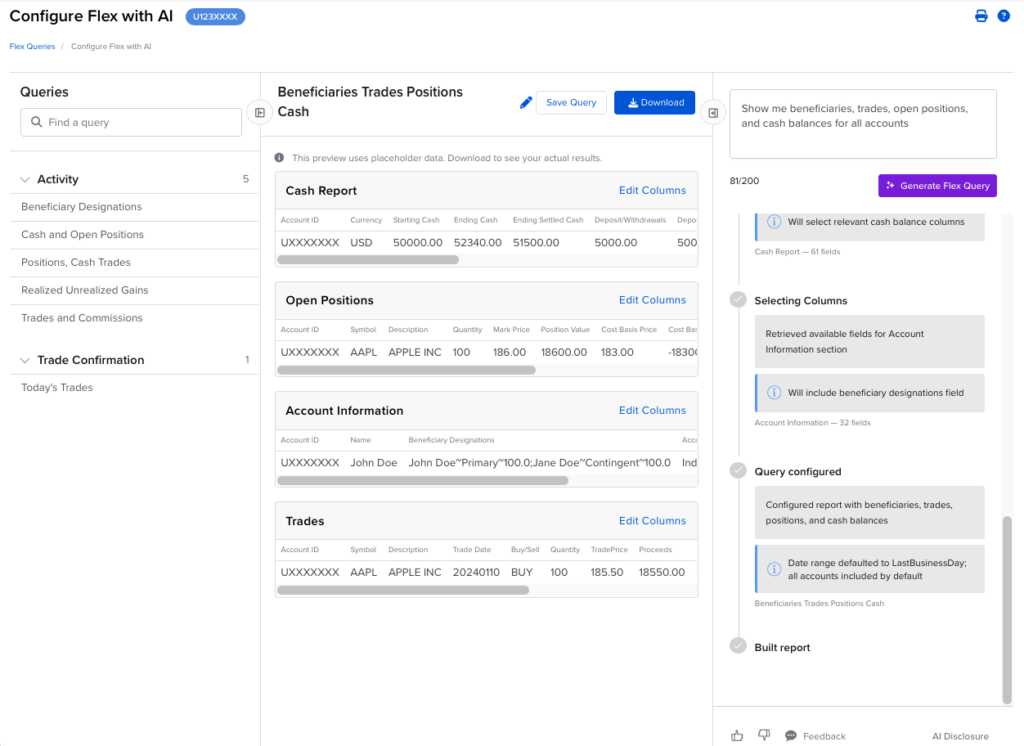
Configure Flex with AI allows you to create and manage Flex Queries using plain-English descriptions without manually navigating query fields or settings. This natural language interface interprets your data requirements and automatically builds the corresponding Flex Query for you.
Simply describe the data you need, and the AI will configure either an Activity Flex Query or a Trade Confirmation Flex Query. Once configured, a preview of your generated query is displayed and includes placeholder data to illustrate the selected sections and columns.
The final report can be downloaded in multiple formats (CSV, XML, or Text). You can also save queries as reusable templates and schedule them for future delivery.
The tool supports all account types currently available for Flex Queries. Data is available up to the previous business day with the exception of Trade Confirmations which can include trades data for the current day.
To configure a Flex Query with AI:
- Log in to Client Portal.
- Click the Performance & Reports
- Click on the Flex Queries page
- Click the Configure with AI in the page header
- Describe the data you want in writing (e.g., “Show me my trades and commissions”) and click Generate Flex Query
- The system will interpret your request and build a Flex Query configuration for you.