cTrader mobile app introduces My cTrader, improves in-app navigation and upgrades charts

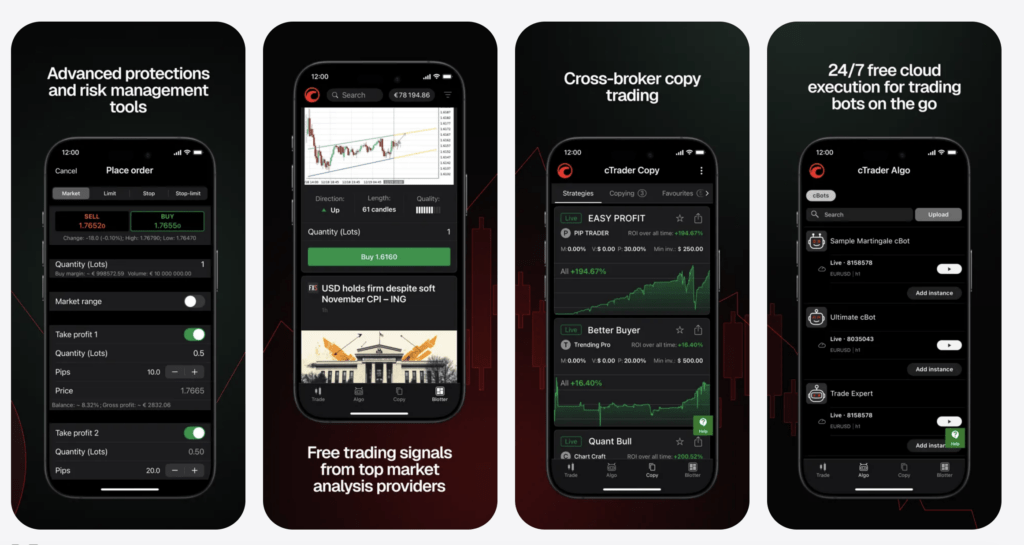
Fintech company Spotware Systems has rolled out cTrader Mobile 5.9 for iOS-based devices, introducing My cTrader, improving in-app navigation and upgrading charts.
My cTrader is a new trading hub available from the bottom bar. Here, you can switch between trading accounts, create new ones, deposit and withdraw funds and grant account access to others. Traders can also share their real-time account stats via a public link to showcase their trading experience and build online trust.
My cTrader provides access to trading products, including copy strategies, cBots and plugins, to make the most of Trader.
Further, My cTrader enables customisation of profile pages, sharing of invite links and monitoring of invited traders’ progress.
My cTrader is also an entry point for multiple settings, support channels, Help Centre and official social media.
Further, the latest release of cTrader Mobile enables traders to access charts instantly with markets now just one tap away from the bottom bar. Navigate more efficiently across the app and reach key trading areas without unnecessary steps.
Chart updates include:
- Chart tools – open controls with a single tap on the chart for quicker access.
- Floating panel – manage orders, positions and chart objects from a new draggable panel.
- Trading focus – tap a position or order on the chart to spotlight it while all others dim.
- Crosshair focus – highlight the selected bar or measured period when using the crosshair.