Interactive Brokers adds Book of Business to Advisor Portal

Electronic trading major Interactive Brokers has updated the IBKR Advisor Portal to make managing clients and accounts faster and easier.
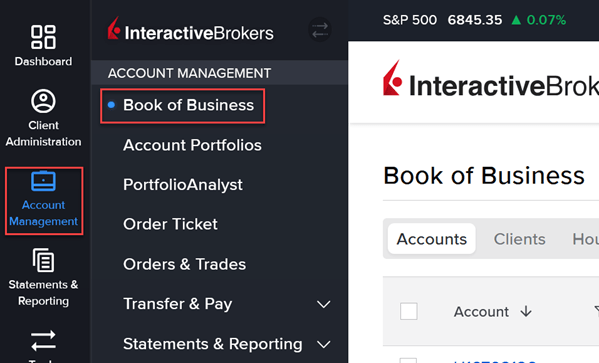
The updated navigation streamlines your workflow and provides access to the new Book of Business, your new central hub for account management.
The brokerage has refined the navigation to clearly separate tools for administering clients from those for managing accounts, making it easier to find what you need.
Client Administration centralizes all client-related tools, enabling advisors to manage contacts, households, tasks, billing, communications, and client preferences from one place. It supports efficient service delivery through integrated email, calendar, and goal-tracking features.
Account Management focuses on portfolio and account oversight, offering tools for trading, reporting, transfers, billing, and performance analysis. It provides a complete view of the advisor’s book of business and simplifies daily account operations.
The New Book of Business now serves as the primary hub for all account activities, conveniently accessible under Account Management. This upgrade streamlines navigation, reducing clicks and enabling instant access to all the accounts of your full client base.
To open Book of Business, enable the new Updated Navigation in the settings by taking the steps outlined below.
Navigate to the head and shoulders icon in the top right corner and select the toggle icon to the right of Updated Navigation.

You may now open the Book of Business page by selecting Account Management > Book of Business.