Cboe Silexx makes enhancements to Option Chain, Order Ticket

Cboe Silexx, a multi-asset order execution management system (OEMS) that caters to the professional marketplace, has announced the release of version 25.15, featuring a set of enhancements to Option Chain and Order Ticket.
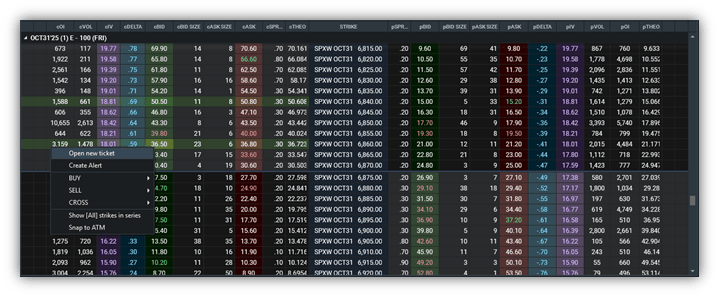
- Option Chain | Determine Buy/Sell for Multi-leg Orders when Using Ctr + Left Click
When using ctrl + left click to select multiple legs and launch a ticket from the option chain, the side will now be determined if bid or ask is clicked. Once legs are selected, right click and select ‘Open new ticket.
- Option Chain | Strike Ladder Locking During Mouse Hover
The strike ladder in the Option Chain now remains fixed when you hover your mouse over an expiry, ensuring precise click targeting even in fast-moving markets. The ATM line and shading will continue to update dynamically, while the ladder itself stays visually stable. The ladder will only re-center when your mouse moves away from the expiry.
- Option Chain| Prevent Linking Updates on Right Mouse Clicks
Users can now access the right-click menu in Option Chain without updating linked windows with the selected symbol. Symbols will only be sent to linked modules when using a left-click, preventing unintended updates during right-click actions.
- Order Ticket | Automatic Quantity Clearing After Order Cancellation
The Order Ticket now clears the quantity input box after an order is canceled, helping to prevent unintended order submissions. This enhancement is available when enabling the updated setting in File > Settings > Ticket Settings > Clear quantity after order accept or cancel.

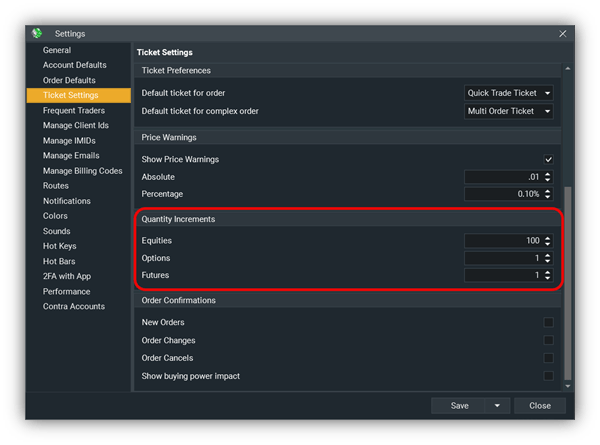
- Ticket Quantity Increments | Customizable Increments for Tickets
Custom quantity increments can now be defined for equities, options, and futures directly within File > Settings > Ticket Settings > Quantity Increments. The values set here correlate to order size adjustments when using the spinner arrows making it easier to tailor quantity increase or decrease order amounts.