
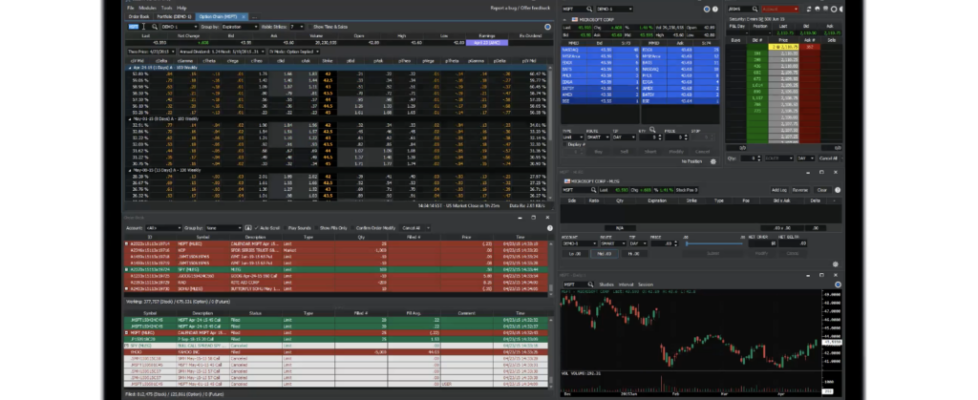
Cboe Silexx enhances option chain module, adds route lock to order ticket

Cboe has announced a set of enhancements to Cboe Silexx, a multi-asset order execution management system (OEMS) that caters to the professional marketplace.
Version 26.9 of Cboe Silexx adds a new API endpoint, introduces Intrinsic Value as a column option in the option chain module, and equips the Route field in the Order Ticket with locking functionality.
API | Update CAT Details Endpoint
A new API endpoint exposes the Update CAT Details functionality, allowing programmatic updates to CAT details across orders. Previously, CAT details could only be updated one order at a time through the Order Manager UI (right-click > Update CAT Details).
- Bulk-update CAT details across many orders at once.
- Integrate CAT corrections into automated post-trade workflows.
- Reduce manual effort during high-volume trading sessions.
- Refer to the API documentation for endpoint details and request/response schemas.
Box Spread Strategy Support | Multi Order Ticket Implied Rate Display
Traders building European-style box spreads can now see the implied rate directly within the Multi Order Ticket and Quick Ticket, removing the need for external spreadsheet calculations.
When a European-style box spread is loaded, a new row appears beneath the price summary displaying:
- Limit Price (shaded green for credit/Borrow, red for debit/Lend)
- Borrow / Lend label
- Bid, Mid, Ask, Theo rates
- Days to Expiration

Option Chain | Intrinsic Value
The option chain module now includes Intrinsic Value as a column option. This can be added via Option Chain Settings > Option Columns.

Order Ticket | Route Lock
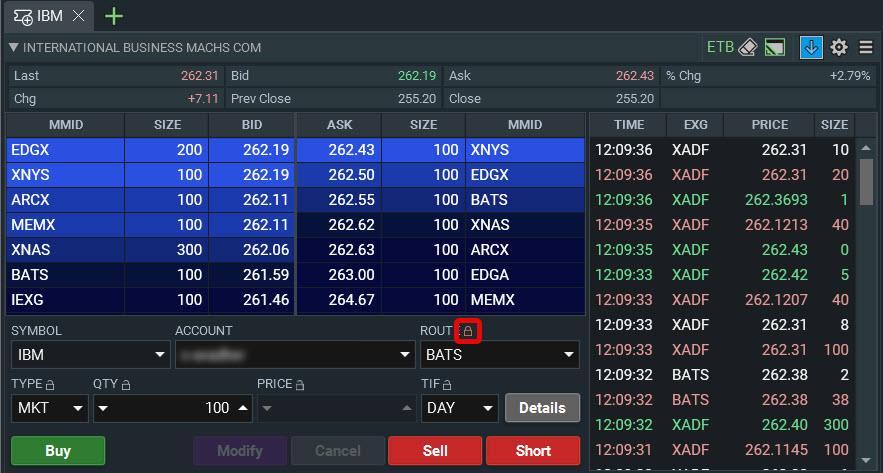
The Route field in the Order Ticket now supports locking, joining the existing Type, Qty, Price, and TIF locks. Lock your preferred route to prevent it from being overwritten by order defaults or cleared between submissions.
Click the new lock icon next to the Route field label.
The selected route is now retained after order submission and protected from order defaults when changing symbols or accounts.
Interaction with Order Defaults
The Route lock takes precedence over order defaults only while the locked route remains valid for the current symbol/account. If the locked route is not in the rebuilt route list on symbol change, the lock releases and order defaults apply normally.
Walkthrough using a stock order default of route = BATS and an option order default of route = CBOE:
- Load a stock symbol; route populates to BATS from the stock order default.
- Manually change the route to another stock route and click the Route lock.
- Change to a different stock symbol and the selected route in the previous step remains, the lock blocks the stock order default (BATS) from overwriting it.
- Change to an option symbol and BATS is no longer a valid option route, so the route clears, the lock automatically releases, and the option order default (CBOE) is set and the field behaves as unlocked.
- If no order default exists for the new security type, the route simply clears (red validation) and the lock releases as there is nothing to repopulate it.
Other Behavior
- Lock state is per-ticket and resets when the Order Ticket is closed (consistent with other field locks).
- Hot keys/hot buttons override the Route lock, as with other locks.
- Applies to single-leg Order Tickets only.


