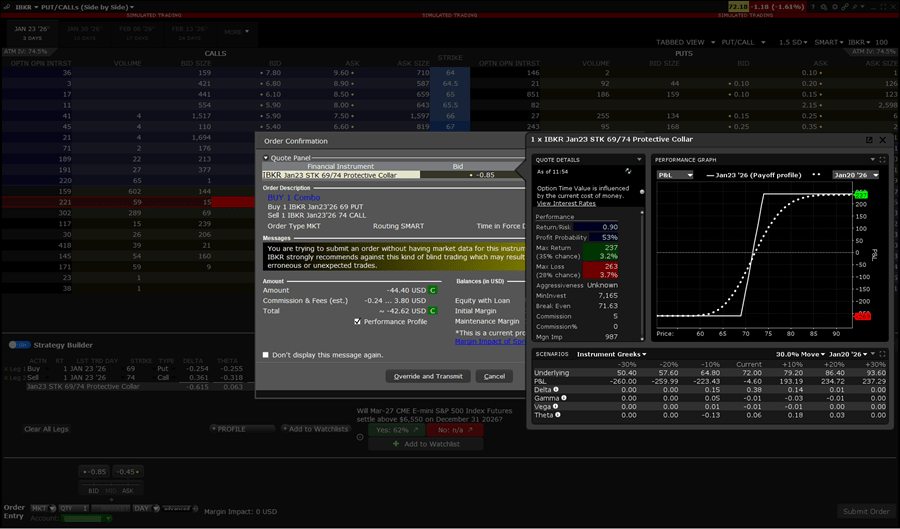
Interactive Brokers adds Protective Collar option strategy in TWS platform

Electronic trading major Interactive Brokers has added Protective Collar options trading strategies in in the Strategy Builder of the Option Chain in the TWS platform.
This options trading strategy provides a way for clients to protect an existing position from losses below a certain amount at the cost of capping upside.
To utilize this tool, please take the following steps:
- For Mosaic – Click the New Window button in the top left corner and select Option Chain
- For Classic TWS – Click the Trading Tools button across the top of the page and select Option Chain
- Enter an underlying in the top left corner of the Option Chain window and press Enter.
- The Option Chain for this product will appear.
Toggle the Strategy Builder on in the bottom left corner.
In the right corner of the Strategy Builder, select the Strategies drop-down menu. Select the Protective Collar strategy.
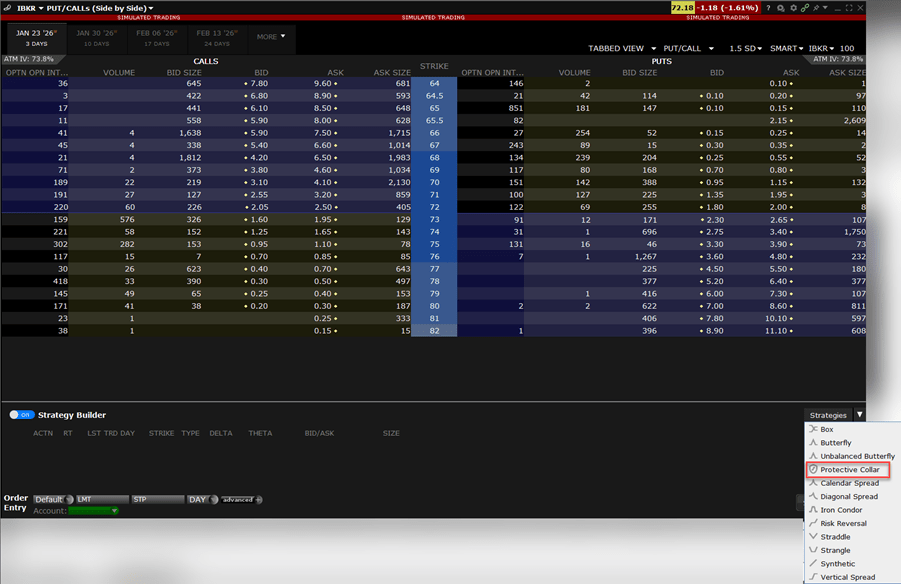
Select the legs from the Option Chain to apply the Protective Collar Option Strategy.
The order ticket will populate below the Option Chain. Make modifications as needed and click Submit Order.
An additional order preview will populate. Review the order and select Override and Transmit to place the order.